


Skip to Content
Product Icon

App contacts by category company superbar

Technical Name:
app_contacts_superbar
License:
LGPL-3
Included Dependencies :
None
Lines of code:
22
Code Value:
¥ 2.64
Follow Odoo's public price policy, The code valuation is $12.00 per 100 line code. Here we only get code line of this app. Depends is included.
Here we only get code line of this app. Depends is included. Total line of Source Code. Including .py, .js, .css and xml file.
¥ 0.00 ¥ 0.00
Coupon: 中国区9折 会员赠积分 VIP专享
664
  • Version
App Icon

通讯录联系人超级导航 / Contacts Partner Superbar

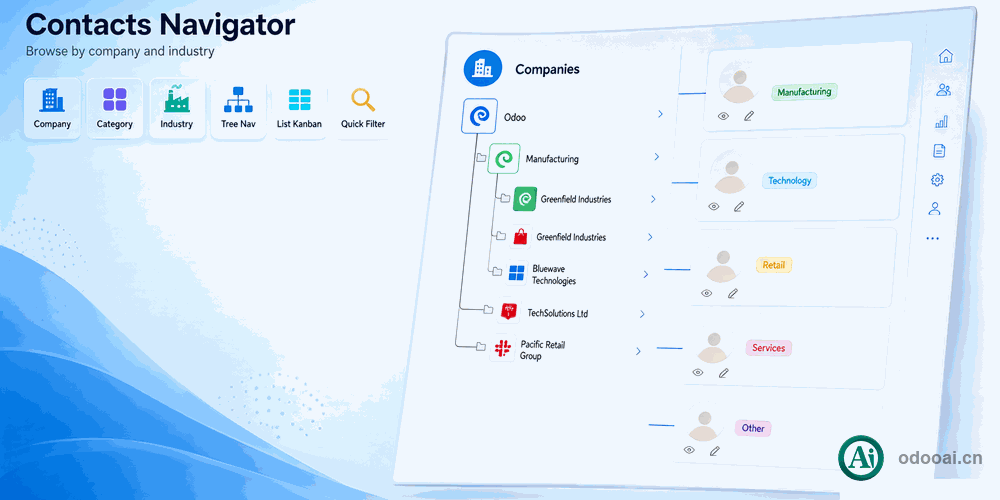
按公司、类别、行业树状浏览联系人 / Browse Contacts by Company, Category & Industry

以树状结构快速导航联系人数据,支持按公司层级、合作伙伴类别和行业分类筛选
Navigate contacts with hierarchical tree structure by company, partner category and industry

Odoo 20 企业版与社区版 / Enterprise & Community 多公司 / Multi-Company 多语言 / Multi-Language

功能概述 / Overview

为 Odoo 通讯录模块提供强大的侧边栏超级导航功能,支持按公司、合作伙伴类别、行业等多维度树状浏览联系人。在列表、看板、数据透视和图表视图中均可使用。

Provides a powerful sidebar superbar navigator for the Contacts module, enabling hierarchical browsing of partners by company, category, and industry across list, kanban, pivot and graph views.

核心亮点 / Key Highlights

多维度联系人树状导航 / Multi-Dimensional Contact Tree Navigation

1. 按公司层级导航 / Navigate by Company

Parent-Children Hierarchy

按公司父子公司关系树状浏览联系人

2. 按类别筛选 / Filter by Category

Partner Category with Counters

按合作伙伴类别筛选,显示各类别计数

3. 按行业分类 / Filter by Industry

Industry Type Navigation

按行业类型快速筛选联系人

4. 多视图支持 / Multi-View Support

List, Kanban, Pivot, Graph

在列表、看板、透视和图表视图中使用

5. 多公司分组 / Multi-Company Grouping

Company Group Filter

按公司分组筛选,适配多公司架构

6. 一键开关 / Toggle Visibility

Show/Hide Superbar

一键显示或隐藏超级导航栏

通用特性 / General Features

多语言与多公司
Multi-Language & Multi-Company

完整的多语言翻译支持,适配全球化企业部署。原生多公司架构,数据严格隔离。

全版本兼容
Full Version Support

支持 Odoo 20, 19, 18, 17, 16, 15, 14, 13, 12,EE/CE/.SH,兼容企业版、社区版及在线 SaaS。

代码完全开源
Full Open Source

基于 LGPL-3 协议开源,代码透明可审计,支持二次开发与定制。

界面截图 / Screenshots

联系人超级导航功能界面一览

Use in Contacts / 在通讯录中使用

Contacts Superbar

Show superbar in list view / 列表视图中的超级导航

List View Superbar

Show superbar in kanban view / 看板视图中的超级导航

Kanban View Superbar

Show superbar in pivot view / 透视视图中的超级导航

Pivot View Superbar

Show superbar in graph view / 图表视图中的超级导航

Graph View Superbar

Click switch to show or hide superbar / 点击切换显示或隐藏

Toggle Superbar

Checkbox to show child nodes data / 复选框控制子节点数据

Child Nodes Checkbox

Press Ctrl/Cmd to Select Multi Nodes / 按Ctrl多选节点

Multi Select Nodes

Set multi field to search or filter / 设置多字段搜索筛选

Multi Field Search

Customize superbar with extra params / 使用参数自定义超级导航

Customize Superbar

免费关联模块 / Free Related Apps

安装本模块后,以下关联模块可免费下载使用

Free Download 10+ Apps

使用流程 / How It Works

安装模块

Install Module

重启服务

Restart Odoo

打开通讯录

Open Contacts

树状导航

Tree Navigation

支持与依赖模块 / Supported & Dependent Modules

  • Contacts
Banner

odooai.cn

专业Odoo服务伙伴-开发实施咨询培训全套解决方案 / Professional Odoo Solutions

Website: www.odooai.cn

Demo: demo.odooapp.cn

Support: odoo@china.com

QR Code

Specifications

Version 20.0, 19.0, 18.0, 17.0, 16.0, 15.0, 14.0, 13.0, 12.0, 11.0, 10.0